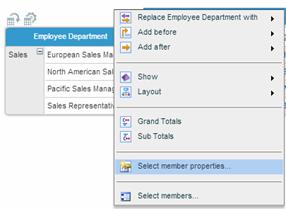
If the members of a dimension have properties defined in the data source, you can display them in the grid using the Select Member Properties option from the dimension’s menu.
To show member properties for a dimension:
1. Click on the dimension heading and select Select member properties from the dimension menu.
2. In the Member Properties dialog box, click  next to the property you want to show.
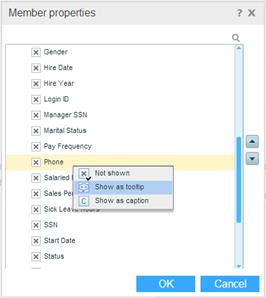
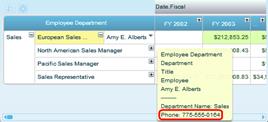
The Not Shown option is selected by default. To show the property in the member tooltip, select Show as tooltip. In the following example, the property “employee phone number” has been selected to show in the tooltip:
To show the property as a caption, select Show as caption. The property value will replace the member caption in the grid.
To remove the property selection, select Not Shown.