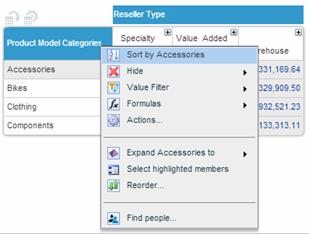
 in the column or row heading, and from the member menu select Sort by <member name>.
You can sort grid data by a dimension member in a column or in a row. It is also possible to sort both by a column and by a row at the same time.
Data can be sorted in ascending or descending order.
Click in the column or row heading, and from the member menu select Sort by <member name>.
An arrow ( or
or  ) appears in the heading of the sorting member, indicating the direction of the sorting. By default, sorting is performed in descending order. Click the arrow to reverse sorting.
Click in the column heading, and from the member menu select Sort by <member name>. Then, do the same for the row.
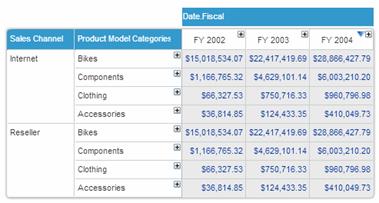
When the data in the grid is in hierarchical layout or if it contains nested dimensions, the sorting is performed within each parent level without breaking the hierarchies or the nesting.
In the following example, the dimension Product Model Categories is nested after Sales Channel, and the grid is sorted by FY 2004. Sorting is performed within both the outer level (Sales Channel) and the inner level (Product Model Categories for Internet and Product Categories for Reseller).
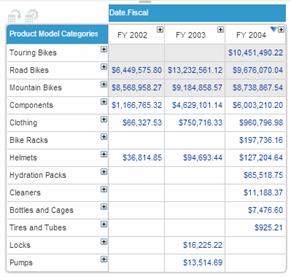
In flat layout, sorting is performed for all the displayed members considering them as one level.
In the following example, the Product Model Categories dimension is in flat layout. The data is sorted by FY 2004, across the entire dimension.
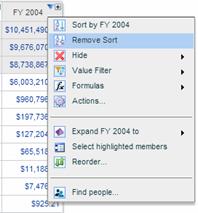
Click in the sorting member’s heading, and select Remove Sort.
Sorting is removed from both the grid and the chart.