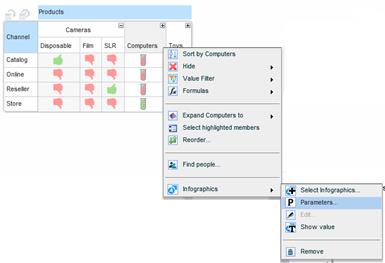
Each predesigned infographics entity comes with a set of parameters for adjusting the visuals: setting conditions and thresholds, changing colors and images, rotating images, and more.
To open the relevant parameters, select Infographics > Parameters from the Settings menu of the grid, or from a specific column/row menu.
The Parameters dialog box for the applied infographics opens.
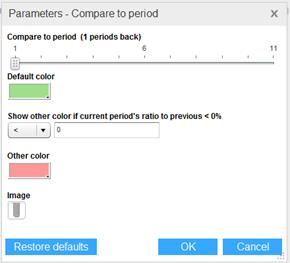
The parameters come with default values. Change the parameter values to adjust the visuals according to your needs. For example, if you are using the Compare To Period infographics, you can set the number of comparison periods, change the color of the representation, set a threshold for the current period ratio and change the color for the ratio as well. To change the image, click on it and select a new one from the image library.
To restore the parameters to their default values, click Restore Defaults.