 the view component. Then, click the Formulas
  button on the View Task Pane toolbar.
With the Formulas options, you can build your own calculations based on the data in the grid, and save them with the workboard. The possibilities range from the simple sum of two columns to complex time calculations. Formulas enable you to create your own members, to combine members in new ways and to perform calculations on members that have not been built into the cube.
A formula is displayed as a member in the grid, at the same level as the selected member(s). It remains as a dimension member whether or not it is taken out of the grid, and can be used for slicing.
To use the Formula feature in the simplest way, you can select one or more grid members and choose a formula template to apply. Via the Formula Pane, you can define more advanced formulas, and build calculations using the Free MDX option.
To display the Formula Pane:
Maximize the view component. Then, click the Formulas button on the View Task Pane toolbar.
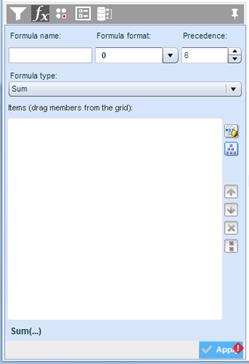
You can also directly select Formulas > New Formula from a member menu on the grid. This will both select the member and open the Formula Pane.