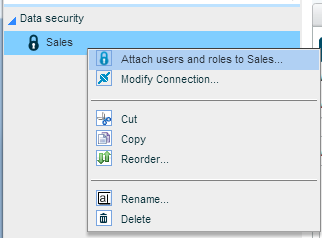
next to the folder or data security definition to which you want to attach users/roles. From the options menu, select Attach Users and Roles.
When you attach a specific user or a role to a data security definition, that user or the users belonging to the role will have the access rights set in the definition, for the data scope included in it.
You can attach users and roles to a specific data security definition, or to a folder in order to apply all the data security definitions under that folder.
To attach users/roles to a data security definition:
1. Click next to the folder or data security definition to which you want to attach users/roles. From the options menu, select Attach Users and Roles.
2. In the Apply Security to Users & Roles dialog box, click the Add  button.

3. Click on the User/Role field.
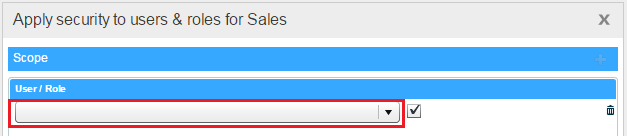
4. From the list that displays, select the user who will have the security settings included in this data security definition or folder.
To apply the security to a role, first click  to display the list of roles and then choose a role.
Click OK.
5. Repeat Steps 2-4 for each additional user/role.
6. Click OK to save the definition.
To deactivate or delete an assignment:
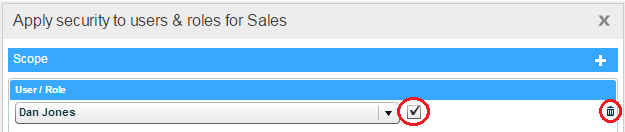
To deactivate a user/role assignment, in the Apply Security to Users & Roles dialog box deselect the check box for that user/role.
To delete an assignment, click the Delete  button for the relevant user/role.